
CHAPTER 03 OF 8
Turn a request into a booked visit
Ask when the caller is available, offer matching times, and save the request, job, and appointment only after an exact-time confirmation.
1. Check the service and coverage
Load the business’s active services and confirm which one matches the caller’s need. Check coverage for the customer, property, and service together. A staff list helps you explain who can handle the work, but the availability response determines which staff are eligible for each slot.
The business configures its catalog, service areas, staff qualifications, and booking hours in ServiceKeel before connecting your app. The example expects a 60-minute “Heat-pump quote” service covering ZIP 53703.
GET/field_service/services
List catalog services with approved fees, duration and required skills
| Name | Location | Type / schema |
|---|---|---|
service_type | query | string |
branch_id | query | string |
active | query | boolean |
Documented responses: 200
GET/field_service/service_area
Check service coverage by postal code or saved service location
| Name | Location | Type / schema |
|---|---|---|
postal_code | query | string |
address | query | string |
property_id | query | string |
customer_id | query | string |
service_id | query | string |
service_type | query | string |
Documented responses: 200
GET/field_service/staff
List shared staff with branch, skills, coverage and on-call details
| Name | Location | Type / schema |
|---|---|---|
branch_id | query | string |
skills | query | string |
postal_code | query | string |
active | query | boolean |
on_call | query | boolean |
Documented responses: 200
const services = await api('GET', '/services?active=true');
const service = services.items.find(item => item.name === 'Heat-pump quote');
if (!service) throw new Error('Ask the business to configure this service');
const coverage = await api('GET', '/service_area?' + new URLSearchParams({
  customer_id: customer.id, property_id: location.id, service_id: service.id,
}));
if (!coverage.covered) throw new Error('Offer a handoff: address outside service area');
const staff = await api('GET', '/staff?active=true&postal_code=53703');2. Ask the caller when they are available
“Could someone quote a heat-pump repair?” identifies a service need. It supplies no appointment date or time. Ask “What date and time window works for you? All times are Central time.” Wait for the caller’s answer before looking for matching slots.
Collect a calendar date, a time window, and the business timezone. In this demo the caller enters a date and chooses morning (8 AM–noon) or afternoon (noon–5 PM) in America/Chicago. A production voice assistant can accept natural language, but must resolve “tomorrow” or “next Friday” against the business’s local date and clarify ambiguous answers. Ask again if the caller gives no date, changes the service/address, or has not agreed to the timezone.
Caller: Could someone quote a heat-pump repair at 123 Demo Lane?
Receptionist: What date and time window works for you? All times are Central time.
Caller: Sunday, October 4, 2026, in the afternoon.
Receptionist: I can offer October 4, noon–1 PM or 1–2 PM Central time. Which works for you?
Caller: 1–2 PM works.
Receptionist: To confirm: book a quote at 123 Demo Lane for Sunday, October 4, 2026, 1–2 PM Central time. Shall I save that appointment?
Caller: Yes, book that time.
Receptionist, after a successful write: You’re booked for Sunday, October 4, 2026, 1–2 PM Central time.
These dialogue dates are illustrative. The runnable demo offers actual API results for the date the caller enters; the test selects a future date at runtime. The demo’s form simulates a caller reply, not speech recognition or AI reasoning.
3. Offer times that match the caller’s answer
Query availability for the caller’s date, customer, property, and service. Filter returned slots to the requested date and time window in the business timezone. Offer at most two distinct matching times with their complete date, start, end, and timezone. Wait for a selection; never automatically book the first result. Keep the returned slot and eligible staff on your server, associated with an opaque offer ID for this call.
If no slot matches, explain that nothing has been booked and ask for another date or window, or offer a human handoff. Do not silently widen the search and book a different day.
The demo expires its offers after five minutes. Another booking can take the same time. The visit write rechecks scheduling and returns HTTP 409 if the slot conflicts. Refresh availability and offer a new choice instead of promising a booking.
GET/field_service/availability
Find tenant appointment availability across booking forms
| Name | Location | Type / schema |
|---|---|---|
service_idrequired | query | string |
starts_afterrequired | query | string |
ends_beforerequired | query | string |
timezone | query | string |
booking_form_id | query | string |
customer_id | query | string |
property_id | query | string |
staff_id | query | string |
duration_minutes | query | integer |
Documented responses: 200 400
// preferences comes from the caller: validated YYYY-MM-DD and
// window = 'morning' or 'afternoon', with timezone confirmed as America/Chicago.
const timezone = 'America/Chicago';
const [firstHour, lastHour] = { morning: [8, 12], afternoon: [12, 17] }[preferences.window];
// A bounded UTC envelope covers the requested Chicago date across DST.
const start = new Date(preferences.date + 'T00:00:00Z');
const end = new Date(start.getTime() + 2 * 24 * 60 * 60 * 1000);
const availability = await api('GET', '/availability?' + new URLSearchParams({
  service_id: service.id, customer_id: customer.id, property_id: location.id,
  starts_after: start.toISOString(), ends_before: end.toISOString(),
  timezone,
}));
const inBusinessTime = value => {
  const p = Object.fromEntries(new Intl.DateTimeFormat('en-US', {
    timeZone: timezone, year: 'numeric', month: '2-digit', day: '2-digit',
    hour: '2-digit', minute: '2-digit', hourCycle: 'h23',
  }).formatToParts(new Date(value)).map(({ type, value }) => [type, value]));
  return { date: [p.year, p.month, p.day].join('-'), minute: +p.hour * 60 + +p.minute };
};
const matching = availability.items.filter(slot => {
  const start = inBusinessTime(slot.starts_at), end = inBusinessTime(slot.ends_at);
  return start.date === preferences.date && end.date === preferences.date &&
    start.minute >= firstHour * 60 && end.minute <= lastHour * 60 &&
    Date.parse(slot.starts_at) > Date.now() && slot.eligible_staff_ids?.length;
});
// Deduplicate matching times, offer two, and WAIT for a caller selection.
// No matching slots: ask for another date/window. Do not save anything.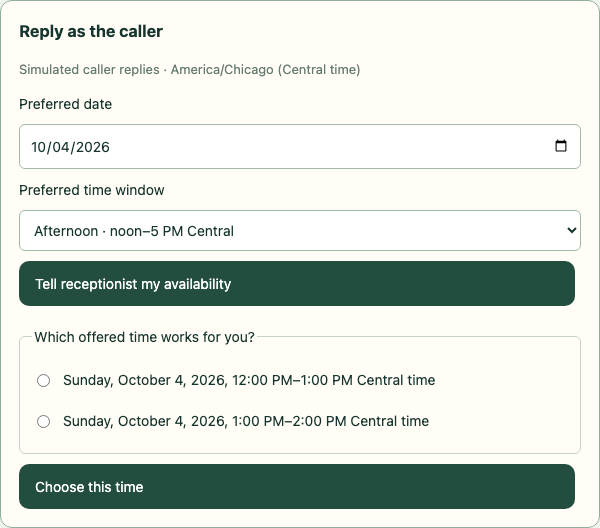
The demo is paused for the caller’s choice. No request, job, or appointment has been saved.
Select the image to view it at full size.4. Require an explicit appointment confirmation
After the caller selects one offered time, read back the service, property, full calendar date, start–end time range, and timezone. Ask “Shall I save that appointment?” and wait for an explicit yes to that exact proposal. A quote request, an availability question, silence, or choosing a time is not the final confirmation.
Enforce preferences → offered → confirmation → saved on your server. Only accept offer IDs from this call’s current availability response. Generate a fresh confirmation ID for the selected proposal; bind it to the business, caller, customer, property, service, and selected slot. Changing any of those details, choosing another date, or expiring the offers invalidates the earlier confirmation. Reject missing, invented, stale, or already-consumed IDs before any booking write.
In a real AI receptionist, expose separate tools for collecting preferences, offering times, selecting a proposal, and confirming it. The conversation layer may submit confirmation only after an unambiguous caller reply to the readback. An LLM-generated confirmed: true is not evidence by itself: associate it with the actual caller turn and the current proposal. Keep the transcript and tool state for review.
The runnable mock implements these guards in Receptionist.appointment(). Its /api/appointments/preferences, /select, /revise, and /confirm routes belong to the example application, not the ServiceKeel API. The explicit confirmation form substitutes for a spoken caller reply.
// Application-server pseudocode; pending is stored per connected call.
// Called only after the conversation layer captures the caller's explicit yes.
if (pending.phase !== 'confirmation' || callerReply.confirmed !== true ||
    callerReply.confirmation_id !== pending.proposal.id ||
    pending.expiresAt <= Date.now()) {
  throw new Error('Ask the caller to select and confirm a current offered time');
}
// Take the slot from server state, never arbitrary timestamps supplied by a model.
const selectedSlot = pending.proposal.slot;
// Serialize confirmation per call, consume it once, and retain every saved ID.
// Only now run the request → job → visit writes shown below.5. Save the request and convert it to a job
Only after the appointment confirmation gate succeeds, check existing requests for this customer so a repeat call does not open duplicate work. After establishing this is a new request, save the caller’s description and chosen property. Convert that request to a job rather than creating an unrelated job. Save the returned job ID and its relationship to the request.
The conversion uses the shared record-action endpoint in addition to the core receptionist endpoints. Keep each successful result before proceeding; the workflow is not one transaction. If a later visit write fails, preserve these records for reconciliation and do not blindly create them again.
GET/field_service/requests
List requests
| Name | Location | Type / schema |
|---|---|---|
search | query | string |
status | query | string |
customer_id | query | string |
property_id | query | string |
job_id | query | string |
limit | query | integer |
offset | query | integer |
created_after | query | string |
created_before | query | string |
Documented responses: 200 401 403
POST/field_service/requests
Create request
| Name | Location | Type / schema |
|---|---|---|
recordrequired | body | models.FieldServiceRecord |
Documented responses: 201 400 409
POST/field_service/requests/{id}/actions
Run request action
| Name | Location | Type / schema |
|---|---|---|
idrequired | path | string |
actionrequired | body | gin.FieldServiceActionRequest |
Documented responses: 200 400 403 409
const existingRequests = await api('GET', '/requests?customer_id=' + customer.id);
// Reconcile the caller's request with existingRequests before creating.
const request = await api('POST', '/requests', {
  title: 'Heat-pump repair quote',
  customer_id: customer.id, property_id: location.id,
  description: 'Caller requests a quote for a noisy heat pump.',
  custom_fields: { service_id: service.id },
});
let job = await api('POST', '/requests/' + request.id + '/actions', {
  action: 'convert_to_job', version: request.version,
});6. Reserve the confirmed time
Create a visit attached to the job using the selected slot and eligible staff. Only after the write succeeds should your receptionist say “You’re booked.” Persist the visit ID separately from the job ID so later calls can reschedule the appointment without replacing the job.
The example disables notifications. Choose notification behavior deliberately with the business before enabling it in a live integration.
POST/field_service/visits
Create visit
| Name | Location | Type / schema |
|---|---|---|
recordrequired | body | models.FieldServiceRecord |
Documented responses: 201 400 409
let visit = await api('POST', '/visits', {
  title: job.title, job_id: job.id, customer_id: customer.id,
  property_id: location.id,
  starts_at: selectedSlot.starts_at, ends_at: selectedSlot.ends_at,
  timezone: selectedSlot.timezone,
  assigned_user_ids: [selectedSlot.eligible_staff_ids[0]],
  custom_fields: { service_id: service.id },
  notify_customer: false, notify_assigned_users: false,
});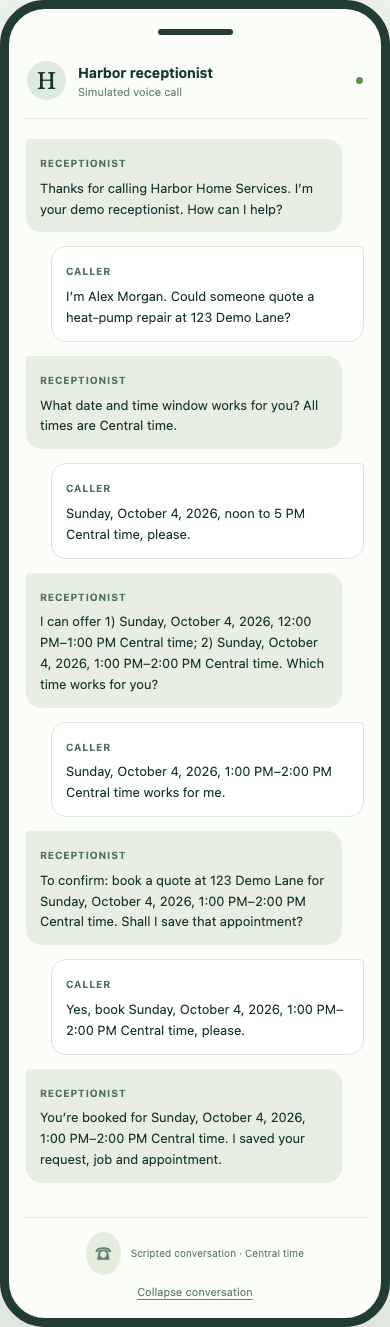
The complete conversation shows the date question, caller’s preferences, offered times, selected time, readback, and explicit yes. Only then do the request, job, and visit writes run and produce the booking confirmation.
Select the image to view it at full size.