
CHAPTER 05 OF 8
Record approvals and useful job context
Carry the caller’s approved pricing, instructions, and equipment documents into the job the business already uses.
1. Retrieve or prepare an estimate
Look for an existing estimate before preparing a new one. Prices are integer cents and totals are calculated by the server. The demo uses a fixed $125 repair; a real receptionist must use pricing authorized by the business, not invent a price from the conversation.
Read back the current estimate and the actual work covered before asking for approval. Patches include the current version.
GET/field_service/estimates
List estimates
| Name | Location | Type / schema |
|---|---|---|
search | query | string |
status | query | string |
customer_id | query | string |
property_id | query | string |
job_id | query | string |
limit | query | integer |
offset | query | integer |
created_after | query | string |
created_before | query | string |
Documented responses: 200 401 403
POST/field_service/estimates
Create estimate
| Name | Location | Type / schema |
|---|---|---|
recordrequired | body | models.FieldServiceRecord |
Documented responses: 201 400 409
GET/field_service/estimates/{id}
Get estimate
| Name | Location | Type / schema |
|---|---|---|
idrequired | path | string |
Documented responses: 200 404
PATCH/field_service/estimates/{id}
Update estimate (PATCH)
| Name | Location | Type / schema |
|---|---|---|
idrequired | path | string |
recordrequired | body | models.FieldServiceRecord |
Documented responses: 200 400 409
const estimates = await api('GET', '/estimates?customer_id=' + customer.id);
// After confirming that a new estimate is needed:
let estimate = await api('POST', '/estimates', {
  customer_id: customer.id, property_id: location.id, title: 'Heat-pump repair',
  line_items: [{ name: 'Heat-pump repair', quantity: 1, unit_price_cents: 12500 }],
});
estimate = await api('GET', '/estimates/' + estimate.id);
estimate = await api('PATCH', '/estimates/' + estimate.id, {
  version: estimate.version,
  description: 'Repair scope reviewed with the caller.',
});2. Record approval and apply pricing to the job
Only run the approval action after capturing the customer’s explicit approval through a method accepted by the business. Do not fabricate a signature from the caller’s name. The demo uses a clearly marked synthetic signature.
Applying the approved estimate to the existing job keeps the request, appointment, and pricing together. Save the updated job version returned by the action.
POST/field_service/estimates/{id}/actions
Run estimate action
| Name | Location | Type / schema |
|---|---|---|
idrequired | path | string |
actionrequired | body | gin.FieldServiceActionRequest |
Documented responses: 200 400 403 409
estimate = await api('POST', '/estimates/' + estimate.id + '/actions', {
  action: 'approve', version: estimate.version,
  signature: callerConfirmedSignature,
});
job = await api('POST', '/jobs/' + job.id + '/actions', {
  action: 'apply_estimate', version: job.version, estimate: estimate.id,
});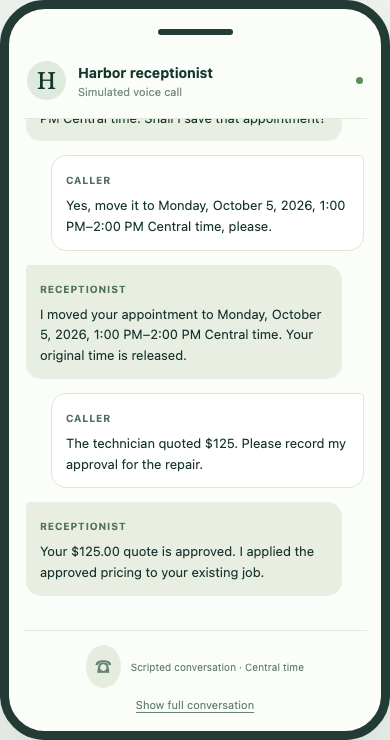
The approval and application are separate writes. Persist the result of each before moving on.
Select the image to view it at full size.3. Add a note to the call’s records
Save operational context such as access instructions as a note linked to the customer and job. Read notes with the appropriate customer filter so another caller’s details never enter the conversation. Store only information the business needs to perform the work.
POST/field_service/notes
Create note
| Name | Location | Type / schema |
|---|---|---|
recordrequired | body | models.FieldServiceRecord |
Documented responses: 201 400 409
GET/field_service/notes
List notes
| Name | Location | Type / schema |
|---|---|---|
search | query | string |
status | query | string |
customer_id | query | string |
property_id | query | string |
job_id | query | string |
limit | query | integer |
offset | query | integer |
created_after | query | string |
created_before | query | string |
Documented responses: 200 401 403
const note = await api('POST', '/notes', {
  name: 'Receptionist call note', customer_id: customer.id, job_id: job.id,
  notes: 'Gate instructions confirmed by the caller. Equipment PDF attached.',
});
const notes = await api('GET', '/notes?customer_id=' + customer.id);4. Upload, complete, then attach a PDF
Document upload has three stages: request a signed upload URL, send the bytes to storage, and complete the asset. Then attach the completed asset with a versioned job patch. The signed URL is bound to the source record, content type, and exact byte length.
Use the returned upload headers unchanged. Never send your OAuth token to the storage URL. Completion validates the file before it can become an attachment. Preserve existing attachments when you append the new one; this uses the generic record PATCH contract with kind=jobs.
POST/field_service/files/upload
Prepare a private Field Service PDF upload
| Name | Location | Type / schema |
|---|---|---|
payloadrequired | body | gin.FieldServiceFileUploadInput |
Documented responses: 200 400
POST/field_service/files/{asset_id}/complete
Complete and validate a private PDF upload
| Name | Location | Type / schema |
|---|---|---|
asset_idrequired | path | string |
Documented responses: 200
PATCH/field_service/jobs/{id}
Update job (PATCH)
| Name | Location | Type / schema |
|---|---|---|
idrequired | path | string |
recordrequired | body | models.FieldServiceRecord |
Documented responses: 200 400 409
const upload = await api('POST', '/files/upload', {
  filename: 'equipment.pdf', size_bytes: pdfBytes.length,
  kind: 'jobs', record_id: job.id,
});
const destination = new URL(upload.upload_url);
if (destination.protocol !== 'https:') throw new Error('Expected HTTPS storage');
const put = await fetch(destination, {
  method: 'PUT', headers: upload.upload_headers, body: pdfBytes,
  redirect: 'error', signal: AbortSignal.timeout(20000),
});
if (!put.ok) throw new Error('Upload failed; do not complete or attach it');
const asset = await api('POST', '/files/' + upload.asset_id + '/complete', {});
job = await api('PATCH', '/jobs/' + job.id, {
  version: job.version,
  attachments: [...(job.attachments || []), {
    asset_id: asset.id, name: upload.filename,
    title: 'Equipment information', shared_with_customer: false,
  }],
});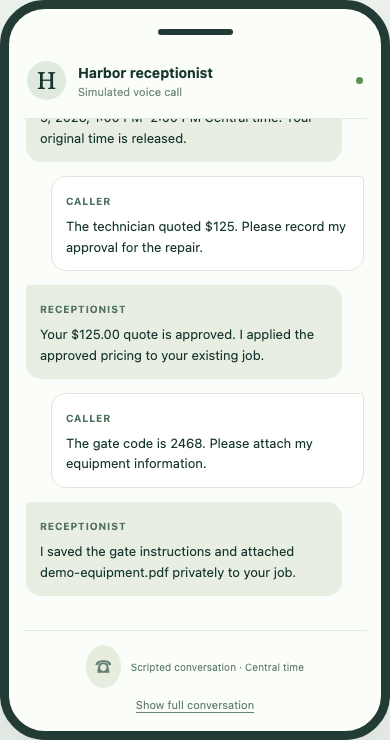
The local test substitutes storage, while the real backend validates completion and saves the attachment relationship.
Select the image to view it at full size.