
BUILD WITH SERVICEKEEL
Build an AI receptionist integration
Turn a caller’s request into a scheduled ServiceKeel job. A practical guide for AI receptionist and marketing platforms, from OAuth consent to the final follow-up.
One caller. A complete service workflow.
Alex calls Harbor Home Services about a noisy heat pump. Your receptionist identifies Alex, checks the service address, asks which date and time window works, and offers matching times from ServiceKeel. Alex chooses a time; the receptionist reads back the full date, time range, timezone, and address and waits for an explicit yes before booking. Later, Alex moves the appointment, approves the repair, asks about the technician, and requests a payment link.
“My heat pump is making a noise. Can someone come out and give me a quote?”
A request for a quote tells you the caller’s service intent. It does not tell you when they are available or authorize an appointment. Ask rather than inventing a date or booking the first API result.
Your platform owns the conversation, voice provider, and AI. ServiceKeel owns the customer, service location, schedule, job, and financial records. Each tool in your assistant calls your server, which calls ServiceKeel using the connected business’s OAuth token.
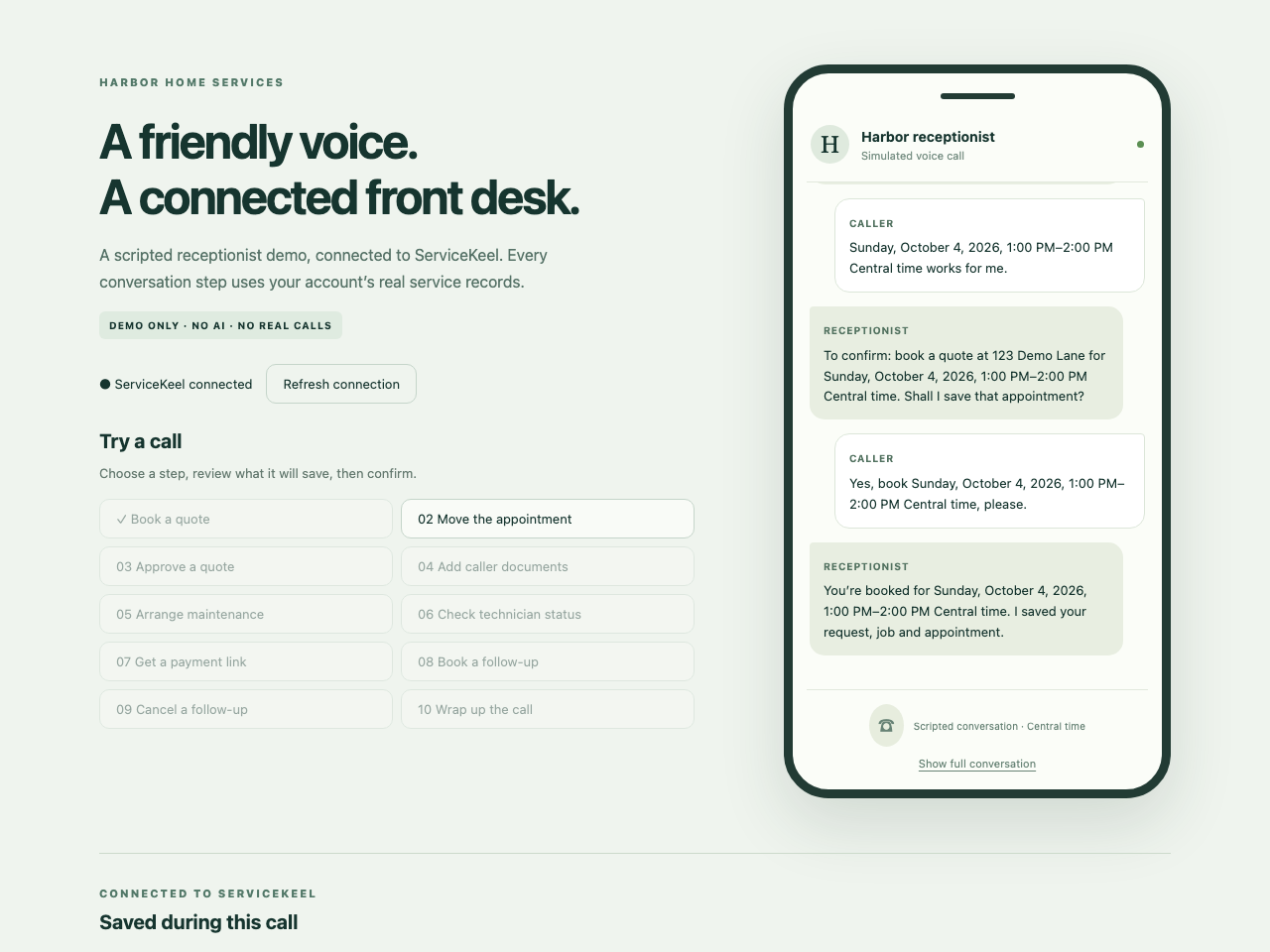
Actual Playwright integration screenshot. The demo uses caller inputs and scripted replies; the confirmed request, job, and visit are saved through OAuth.
Select the image to view it at full size.Follow the integration, one step at a time
This guide follows a runnable JavaScript receptionist. Every chapter explains the caller’s intent, the API calls, and the result to keep for the next step. The examples use the server-side api() helper introduced in the OAuth chapter.
- 01Connect with OAuthRegister your app once. Ask each ServiceKeel business to approve its own connection, then keep that business’s credentials on your server.→
- 02Identify the callerResolve the caller to the right customer and property before checking coverage or scheduling work.→
- 03Book a quoteAsk when the caller is available, offer matching times, and save the request, job, and appointment only after an exact-time confirmation.→
- 04Manage appointmentsUse existing record IDs and current versions to answer follow-up calls without duplicating the original job.→
- 05Estimates, notes & filesCarry the caller’s approved pricing, instructions, and equipment documents into the job the business already uses.→
- 06Offer recurring careUse existing membership and equipment context to arrange ongoing maintenance without implying that future dates are already booked.→
- 07Payment & follow-upRetrieve an issued invoice, prepare customer checkout, offer a review link, and save a useful call record.→
- 08Events & launch checksFollow record changes, verify webhooks, and handle partial work and disconnection before onboarding customers.→
Understand the records you are connecting
| Record | What it represents |
|---|---|
| Customer + location | The person requesting service and the property where work happens. A location ID is passed as property_id. |
| Request → job | The caller’s initial need, then the work the business will carry out. Converting a request preserves this relationship. |
| Visit | A scheduled appointment on a job: time, timezone, and assigned staff. Creating a job alone does not reserve time. |
| Estimate → invoice | Proposed pricing and, later, an issued bill. Checkout prepares a payment session; it does not mean the invoice is paid. |
What the working example proves
The integration test covers all 43 method-and-path patterns used in this guide’s receptionist workflow. It signs up a developer and a separate business, creates the app, completes OAuth consent, and verifies saved records, scheduling conflicts, tenant isolation, token rotation, and revocation.
The test compiles ServiceKeel’s real backend handlers into an isolated local server and uses a temporary MongoDB database. Storage and Stripe providers are simulated. App approval and business configuration are test fixtures. No AI, calls, emails, payments, or outbound webhook deliveries occur. A separate customer account requires app approval in a real integration.
The mock uses no AI. Its “Review → Confirm this step” button starts the scheduling conversation; it is not the caller’s approval of an appointment. The “Reply as the caller” form collects a date and time window, a choice among API-returned slots, and a separate confirmation of the exact appointment. The integration chooses the second offer and asserts that no request, job, or visit is written before that final confirmation. Rescheduling and optional follow-up bookings use the same pauses.
In production, your voice application replaces those form inputs with understood caller replies. Your server must enforce the same state transitions even when an LLM asks to skip a step. Read the booking chapter’s conversation and confirmation contract before wiring your model’s tools.